Showing posts with label RSS. Show all posts

Wednesday, March 18, 2009

RSS 101: Why Would I Want This on My Blog?

When you're marketing your book, you're not only competing with other authors, you're competing with other forms of entertainment, including on the Internet. If you put together an engaging, witty blog that gives people a taste of your work, you might get them once, even if they like what they see.


If you give them an easy way to know when there's new content, you might get them much more often. That readership is a way for you to personally touch your readers, especially if they comment and you respond.


In addition, if you publish non-fiction, your blog can be a great tool for proving yourself as an authority on your topic. Providing periodic tidbits can entice people to purchase and read your entire book.


And regardless of what you publish, if you build readership, you can use your blog to entice others who reach your audience. If you're a mystery writer, maybe you can barter with another mystery writer to guest blog for each other, that gives each of you access to a potentially favorable audience that you wouldn't otherwise have. Using RSS will keep people coming back, which will increase your blog's value and add to your ability to barter.

Tuesday, March 17, 2009

RSS 101: Really Simple Syndication, Part II

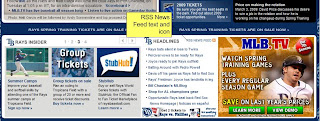
Some websites don't give you a simple My Yahoo button to add the feed to your reader. That's okay. Even if it's not there, subscribing is no big hassle. Because I'm familiar with it, I'll use the Tampa Bay Rays website. If you scroll down to the headlines section (displayed below), you'll see some text that says RSS News Feed with a funny little orange icon next to it.


The orange icon is a universal symbol that means RSS feed. It's not always orange, but it usually looks like that, regardless of the color. If you click the link, you go to a page where you can subscribe to the feed for any team. Click the XML link for the Rays (okay, it says Devil Rays, but the webmaster can own Joe Maddon a dollar). The following page appears, but it's okay. We don't care about that.

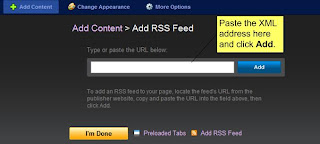
To subscribe, just copy the XML web address out of the address bar, then go to your My Yahoo page (or whatever your reader is), and click the Add Content icon near the top of the page, then click the Add RSS Feed link.

When the field appears to insert the address, copy it in, then click I'm Done.
Why would I want to do all this?
It's and initial investment. After you add the feed, you can see when there's new content without trapsing all over the Internet. You get to decide what you want and consume it in one place. Sort of like going to the food court instead of six different restaurants.


Monday, March 16, 2009

RSS 101: Really Simple Syndication, Part I

Okay, so let's say you've been reading all this blog and saying "I really dig that. I'd like to be able to see the updates without going back, because I forget." You can do that using Really Simple Syndication, or RSS.

RSS is a protocol that allows you to easily subscribe to various sources of information, whether they're blogs, or podcasts, or almost anything else. The screenshot below shows my MyYahoo page. Among other things, it acts as a feed reader, or a place that catches RSS feeds. Sometimes they're also referred to as aggregators.

Five of the seven sections in the screen shot are RSS feeds. They're updated in My Yahoo any time the publisher of the information updates it. One of the feeds is a blog, two are news feeds, one is a podcast feed, and one is a BlogTalkRadio feed.

Subscribing to this Blog
I've made it easy to subscribe to this blog by adding the links to the left. If you have any of the listed feed readers, just click the appropriate link and--boom!--you're subscribed.

What if I Don't Have One of Those?
Get one! If you go to my.yahoo.com, and sign up, you now have a My Yahoo feed reader. And if you click the My Yahoo button, you've subscribed. Really Simple!

Next time, we'll talk more about what to do if the My Yahoo button isn't there. Coming up, we'll also talk about how you can make RSS work for you (and why you'd want to)!